



Endeavor is Auburn University's Electronic Research Administration (ERA) system for managing research administration and compliance activities. Endeavor streamlines proposal development, submissions, approvals, awards, agreement negotiation, faculty pre-approvals for external engagements, and conflict of interest disclosures.
It also supports creation, submission, and approvals of compliance protocols for the Human Participant Protection Program/Institutional Review Board (IRB), the Biological Safety Program/Institutional Biosafety Committee (IBC), and the Institutional Animal Care and Use Committee (IACUC). Endeavor brings all research-related processes into one system facilitating transparency, efficiency, and collaboration across the research lifecycle.
Explore the resources and guidance for each module below to help you get started and make the most of Endeavor.
Endeavor Modules
Before you begin working in Endeavor, be sure you fully understand the System Navigation and Terminology related to its functions.
Endeavor Dashboard Video: This introductory video provides a basic overview of the user dashboard, which serves as the landing page upon logging in to Endeavor and includes all of your action items.






FAQ
Help! I can't login to Endeavor! What do I do?
This is the single most common issue that generates help requests. Let’s talk about how to get you logged in:
• If you are a student who has never used Endeavor before:
The ERA will need to manually create your account. Please submit a ticket at https://aub.ie/endeavorsupport to request access, making sure to include your auburn.edu email address. We are typically able to respond to these requests quickly, during business hours.
• If you are faculty, staff, or a student who has used Endeavor before:
Let’s try to troubleshoot and get you into your account. First, are you able to login to other Auburn University systems using your SSO credentials? To test this, you can go to www.auburn.edu, and click on the AU Access tab in the top right corner. If you are not able to login here, you are experiencing a broader issue and will need to contact OIT at oit@auburn.edu in order to resolve the issues with your SSO credentials.
If you can login to other university systems, here are some steps you can take.
- Clear your cookies and cache from your browsing data. Then, refresh the Endeavor page in your browser. This step can often resolve login issues on its own.
- If you are attempting to login through the Endeavor card in AU Access, please go to https://endeavor.auburn.edu/ to login directly to Endeavor. Conversely, if you are currently attempting to login through the webpage, you can attempt to login through the Endeavor card in AU Access.
- Attempt to login on a different browser. So, for example, if you are currently using Microsoft Edge, try to access Endeavor on Chrome or Safari.
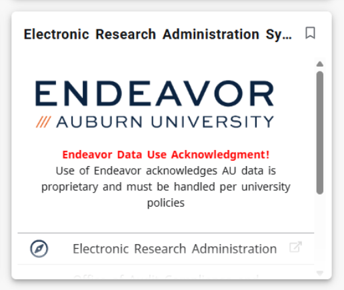
• If you have tried all of these, and are still encountering issues, please contact the ERA by submitting a ticket at https://aub.ie/endeavorsupport. For faster service, you can let us know which of these steps you’re already tested. We are typically able to respond to these requests quickly, during business hours. Please be sure to monitor your email for any questions or updates we may need to communicate.

